- Data Cleaning
- Data Preparation,
- Data Quality
- Data Analytics
- No-Code Automation
- No-Code Automation
- Business Intelligence
10 Best Data Cleaning Tools: Features, Benefits and Use Cases
Compare 10 data cleaning tools for businesses. Explore free, no-code and automated solutions for removing duplicates, fixing errors and improving data quality.
- Published on
- Reading time
- 18 min read
In this article11 sections
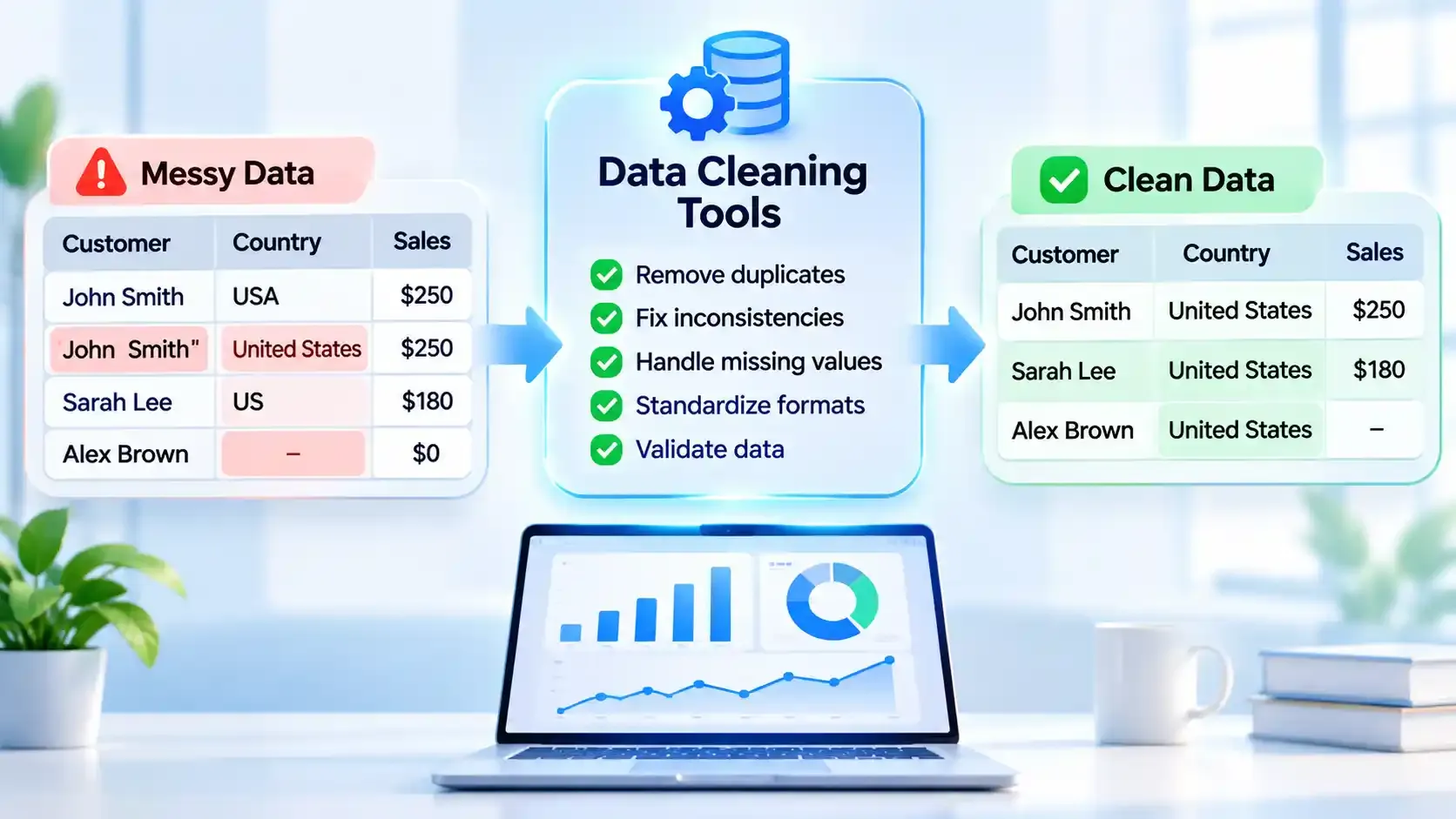
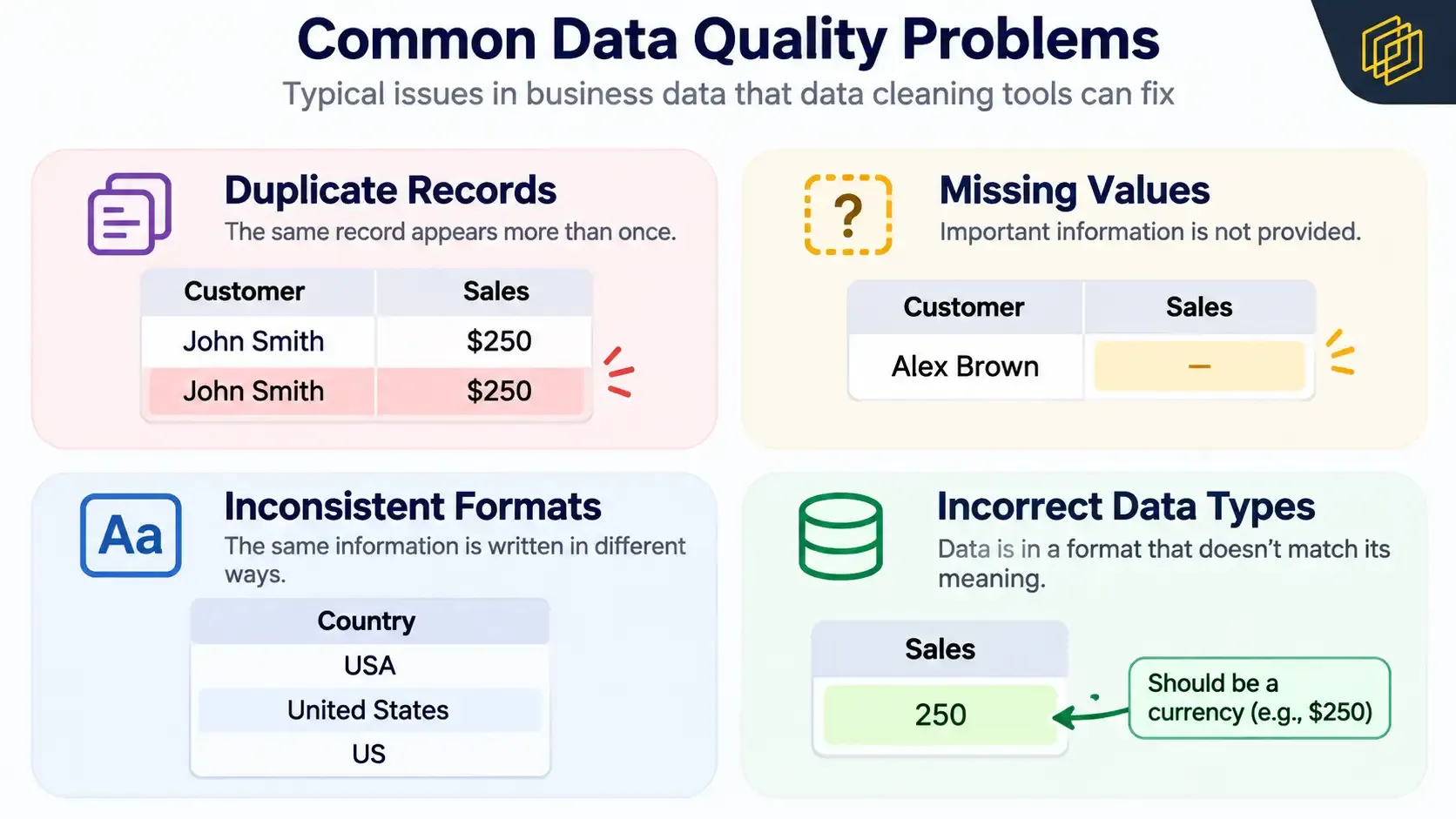
Businesses collect data from customer databases, spreadsheets, sales platforms, marketing applications, and operational systems. However, this information is rarely ready for immediate analysis. Duplicate records, missing values, inconsistent formats, and incorrect entries can affect the reliability of business reports and analytical results.
Data cleaning tools help businesses identify and correct these problems before using their data for reporting, business intelligence, or artificial intelligence. While some tools provide simple spreadsheet-based functionality, others offer visual workflows, automated transformations, and advanced data matching capabilities.
For businesses without dedicated programming teams, no-code data cleaning solutions can make data preparation more accessible and reduce repetitive manual work.
This guide compares ten of the best data cleaning tools, explains their features and limitations, and helps you choose the right solution for your business.
Key Takeaways
- Data cleaning improves the reliability of business data by addressing errors, duplicates, missing values, and inconsistencies.
- OpenRefine and Python pandas are free, open-source solutions for different levels of technical expertise.
- Microsoft Power Query, Tableau Prep, and Zoho DataPrep offer visual data preparation capabilities.
- Automated data cleaning can reduce repetitive tasks, but human verification remains important.
- The right tool depends on your data sources, business requirements, budget, and technical skills.
- Clean data provides a stronger foundation for business analytics, machine learning, and AI-powered decision-making.
What Is Data Cleaning?
Data cleaning, also known as data cleansing or data scrubbing, is the process of identifying and correcting errors and inconsistencies within a dataset to improve its quality and reliability.
According to IBM, data cleaning is an important part of preparing raw data for analysis.
For example, a business may maintain customer information across a CRM platform, an e-commerce system, and several spreadsheets. The same customer might appear multiple times, have different address formats, or have incomplete purchase information.
Analyzing these records without cleaning them first could produce inaccurate customer counts, misleading sales reports, or unreliable customer segmentation.
Common data cleaning tasks include:
- Identifying and removing duplicate records.
- Correcting spelling and formatting inconsistencies.
- Handling missing or incomplete values.
- Standardizing dates, currencies, and units.
- Identifying potentially incorrect or unusual values.
- Correcting incompatible data types.
- Validating records against business rules.
- Removing irrelevant information when appropriate.
Data cleaning is particularly important when businesses combine data from multiple sources, because different systems may store similar information using different formats and structures.
Why Is Data Cleaning Important?
The quality of an analysis depends partly on the quality of the underlying data. Even advanced analytical tools and machine learning models can produce misleading results when their input data contains significant errors.
Effective data cleaning helps businesses:
- Improve reporting reliability.
- Reduce repetitive manual corrections.
- Maintain more consistent customer information.
- Improve data integration processes.
- Prepare datasets for machine learning.
- Support better-informed business decisions.
However, clean data does not automatically guarantee accurate analysis. Businesses must also use appropriate analytical methods and validate their results.
Best Data Cleaning Tools at a Glance
The following comparison highlights ten data cleaning tools suitable for different business requirements and technical skill levels.
| Data Cleaning Tool | Best For | Coding Required | Cost Model |
|---|---|---|---|
| OpenRefine | Messy tabular data and inconsistent text | Usually no | Free, open-source |
| Microsoft Power Query | Excel and Power BI workflows | Usually no | Available through supported Microsoft products |
| Tableau Prep | Visual data preparation | Usually no | Commercial |
| Zoho DataPrep | Business data preparation and recurring workflows | Usually no | Free and paid plans, subject to limits |
| Alteryx Designer | Advanced analytical workflows | Usually no | Commercial |
| WinPure Clean & Match | Customer data matching and deduplication | Usually no | Commercial |
| Dataiku | Data preparation for analytics and AI | Optional | Edition-dependent |
| AWS Glue DataBrew | Cloud-based data preparation | Usually no | Usage-based |
| Python pandas | Custom data cleaning processes | Yes | Free, open-source |
| Microsoft Excel | Basic spreadsheet cleaning | Usually no | Free web access or paid editions, depending on features |
The tools are selected based on their documented functionality and suitability for different use cases. They are not ranked according to measured performance, and feature availability may depend on the product edition or subscription.
10 Best Data Cleaning Tools for Businesses
1. OpenRefine
OpenRefine is a free, open-source data cleaning tool designed for exploring, correcting, and transforming messy datasets.
It is particularly useful when datasets contain inconsistent text values, spelling variations, or multiple representations of the same category.
For example, a customer database might contain company names written as:
- ABC Corporation
- ABC Corp.
- ABC corporation
OpenRefine helps users identify potentially related values and review whether they should be standardized.
Key features:
- Data exploration using facets and filters.
- Clustering similar text values.
- Data transformation.
- Record reconciliation with supported external services.
- Change history and reusable operations.
Advantages: Free, flexible, and particularly useful for inconsistent textual information.
Limitations: Some advanced transformations require expressions, and it may be less suitable for enterprise-scale, continuously running data pipelines without additional infrastructure.
Best for: Analysts, researchers, small businesses, and professionals working with messy tabular datasets.
Official website: OpenRefine
2. Microsoft Power Query
Microsoft Power Query is a data connectivity and preparation technology available in supported Microsoft products, including Excel and Power BI.
It allows users to import information, apply transformations, and repeat preparation steps through a visual interface.
For businesses that receive new sales reports every week, Power Query can help create a reusable cleaning process rather than manually correcting each spreadsheet.
Key features:
- Data profiling.
- Duplicate removal.
- Missing-value and error handling.
- Data type conversion.
- Text and value replacement.
- Combining and transforming datasets.
- Reusable transformation steps.
Advantages: Integrates with familiar Microsoft tools and supports repeatable data preparation.
Limitations: Advanced transformations may require knowledge of the Power Query M language. Available features can vary by application and platform.
Best for: Businesses already using Excel, Power BI, or Microsoft-based reporting workflows.
Official documentation: Power Query data profiling tools
3. Tableau Prep
Tableau Prep is a visual data preparation solution designed to help users clean, combine, and organize information before analysis.
Its graphical workflow makes it easier to understand how data changes between the original source and the prepared output.
Users can inspect fields, identify inconsistencies, group related values, and apply cleaning operations before creating reports or visualizations.
Key features:
- Visual data preparation workflows.
- Data profiling and field inspection.
- Grouping and standardizing values.
- Filtering and transforming records.
- Combining datasets.
- Reviewing changes throughout a workflow.
Advantages: Visual interface and close integration with the Tableau analytics ecosystem.
Limitations: Licensing costs and feature availability depend on the selected Tableau offering. Complex workflows may require additional training.
Best for: Business intelligence teams and organizations using Tableau for reporting and visualization.
Official documentation: Clean and Shape Data in Tableau Prep
4. Zoho DataPrep
Zoho DataPrep is a data preparation platform that helps businesses collect, clean, transform, and enrich information from multiple sources.
Its visual environment is designed to make data preparation accessible to users who may not have programming experience.
The platform can also suggest transformations based on the characteristics of a dataset, helping users identify possible preparation steps.
Key features:
- Data quality assessment.
- Visual transformations.
- Suggested cleaning operations.
- Data standardization.
- Data enrichment.
- Recurring data preparation workflows.
Advantages: Accessible interface and functionality suited to business-oriented data preparation.
Limitations: Processing limits, integrations, and automation capabilities can vary depending on the subscription.
Best for: Small and medium-sized businesses looking for a visual data preparation solution.
Official documentation: What Is Zoho DataPrep?
5. Alteryx Designer
Alteryx Designer combines data preparation, transformation, integration, and analytical capabilities within a visual workflow environment.
It allows users to connect individual operations into a process that can be reused for different datasets.
For example, a finance team could build a workflow that imports transaction files, corrects formatting problems, identifies missing information, and prepares records for reporting.
Key features:
- Visual workflow development.
- Data cleansing operations.
- Data filtering and transformation.
- Combining multiple datasets.
- Reusable analytical processes.
- Advanced data preparation capabilities.
Advantages: Combines data cleaning with broader analytical workflows and supports complex business requirements.
Limitations: Commercial licensing and a learning curve may make it less suitable for businesses with basic spreadsheet-cleaning needs.
Best for: Business analysts, larger organizations, and teams building advanced data workflows.
Official documentation: Alteryx Data Cleansing Tool
6. WinPure Clean & Match
WinPure Clean & Match focuses on data quality, record matching, and deduplication.
It is particularly relevant to organizations managing large customer databases where the same person or business may appear under slightly different names, addresses, or contact details.
Its matching capabilities help identify potential duplicates that simple exact-match comparisons might overlook.
Key features:
- Data profiling.
- Record standardization.
- Duplicate identification.
- Fuzzy matching.
- Customer data cleansing.
- Record consolidation capabilities.
Advantages: Specialized functionality for customer databases and complex matching problems.
Limitations: Businesses looking for general-purpose analytics or visualization may require additional software. Features vary by edition.
Best for: CRM management, marketing operations, customer database maintenance, and master data quality.
Official website: WinPure
7. Dataiku
Dataiku is a broader data and AI platform that includes visual tools for preparing and transforming datasets.
Its Prepare recipe allows users to build data preparation processes without necessarily writing code. These processes can support subsequent analytics and machine learning workflows.
This makes Dataiku relevant to organizations that need both data preparation and more advanced analytical capabilities.
Key features:
- Visual data preparation recipes.
- Data profiling and exploration.
- Data cleansing and normalization.
- Data transformation and enrichment.
- Integration with broader analytical workflows.
- Optional code-based processing.
Advantages: Connects data preparation with analytics and AI development.
Limitations: The platform may be more complex than necessary for businesses that only need basic data cleaning.
Best for: Data teams and organizations building integrated analytics or machine learning processes.
Official documentation: Dataiku Prepare Recipe
8. AWS Glue DataBrew
AWS Glue DataBrew is a cloud-based visual data preparation service designed to help users clean and normalize data without writing code for standard preparation tasks.
Users can create transformation recipes and apply them to datasets within supported AWS environments.
It is particularly relevant to businesses that already store and process information using Amazon Web Services.
Key features:
- Visual data preparation.
- Data profiling.
- Data cleaning and normalization.
- Reusable transformation recipes.
- Recipe-based processing jobs.
- Integration with supported AWS data services.
Advantages: Cloud-based processing and suitability for AWS-oriented data preparation workflows.
Limitations: Requires familiarity with AWS account configuration, permissions, storage, and service costs. Businesses should confirm regional and account availability before adoption.
Best for: Organizations preparing cloud-based datasets within an AWS environment.
Official documentation: AWS Glue DataBrew Developer Guide
9. Python pandas
Pandas is a free, open-source Python library widely used for data manipulation and analysis.
Unlike visual data cleaning programs, pandas requires programming knowledge. However, it offers considerable flexibility when businesses need custom cleaning rules or automated processing scripts.
Developers can create reusable programs to process incoming datasets, identify errors, transform values, and prepare information for analysis.
Key features:
- Duplicate detection and removal.
- Missing-value handling.
- Data type conversion.
- Text processing.
- Filtering and sorting.
- Combining datasets.
- Custom data transformations.
Advantages: Highly flexible, open-source, and suitable for customized data processing.
Limitations: Requires Python knowledge, and users must maintain their own scripts and supporting infrastructure.
Best for: Developers, data scientists, and technical analysts who need customized data cleaning workflows.
Official documentation: pandas User Guide
10. Microsoft Excel
Microsoft Excel remains a practical option for basic business data cleaning, especially when information is already stored in spreadsheets.
Users can identify duplicates, apply filters, correct formatting, standardize text, and use formulas to address common data quality problems.
For a small business managing customer records or monthly sales reports, Excel may provide sufficient functionality without requiring a specialized data cleaning platform.
Key features:
- Duplicate identification and removal.
- Find and Replace.
- Sorting and filtering.
- Data validation.
- Text functions.
- Conditional formatting.
- Power Query integration in supported editions.
Advantages: Familiar interface and accessibility for many business users.
Limitations: Manual spreadsheet processes can become difficult to maintain as datasets grow or cleaning requirements become more complex.
Best for: Small businesses, occasional data cleaning tasks, and spreadsheet-based reporting.
Official documentation: Microsoft's Top Ten Ways to Clean Your Data
How to Choose the Right Data Cleaning Tool
The best data cleaning software is not necessarily the platform with the most features. It is the solution that addresses your specific data problems while fitting your technical capabilities and business processes.
Identify Your Data Quality Problems
Start by understanding what needs to be corrected.
If your primary problem involves duplicate customer records, a specialized matching solution such as WinPure may be appropriate. If you regularly receive inconsistent spreadsheets, Power Query or OpenRefine may provide a simpler approach.
Consider Your Technical Skills
Businesses without developers should prioritize visual or no-code data cleaning tools.
Technical teams may prefer pandas when they require custom transformations, flexible automation, or integration with existing Python-based systems.
Evaluate Data Sources and Volume
Check whether the tool supports your file formats, databases, applications, and expected data volumes.
A solution that works well for a small spreadsheet may not be suitable for processing large datasets from several business systems.
Look for Reusable Workflows
If your organization receives new information regularly, repeating the same cleaning operations manually can become inefficient.
Tools that allow users to save and rerun transformation processes can help maintain consistency across recurring datasets.
Review Data Security and Governance
Business datasets may contain confidential financial information, customer records, or personally identifiable information.
Before selecting a platform, review its deployment options, access controls, data processing policies, and relevant organizational requirements.
Consider the Total Cost
Subscription prices represent only part of the cost of data cleaning.
Training, implementation, cloud processing, maintenance, and the time employees spend preparing information should also be considered.
Manual vs. Automated Data Cleaning
Businesses can clean information manually, through automated workflows, or by combining both approaches.
Manual data cleaning involves reviewing and correcting records individually or applying spreadsheet operations as problems are discovered.
Automated data cleaning uses predefined rules, transformation workflows, or intelligent suggestions to address recurring data quality issues.
| Factor | Manual Data Cleaning | Automated Data Cleaning |
|---|---|---|
| Initial setup | Usually minimal | Requires configuration |
| Repetitive work | Often time-consuming | Can be reduced |
| Consistency | Depends on the person performing the task | Depends on configured rules |
| Scalability | Limited for complex recurring tasks | Better suited to repeatable processing |
| Human judgment | Directly involved | Still required for ambiguous cases |
| Best use case | Occasional corrections | Recurring data preparation |
Automation does not eliminate the need for oversight. An automated workflow can repeatedly apply an incorrect rule just as easily as a correct one.
Businesses should validate cleaning rules, review unusual records, and monitor the quality of processed information.
How to Clean Business Data Without Coding
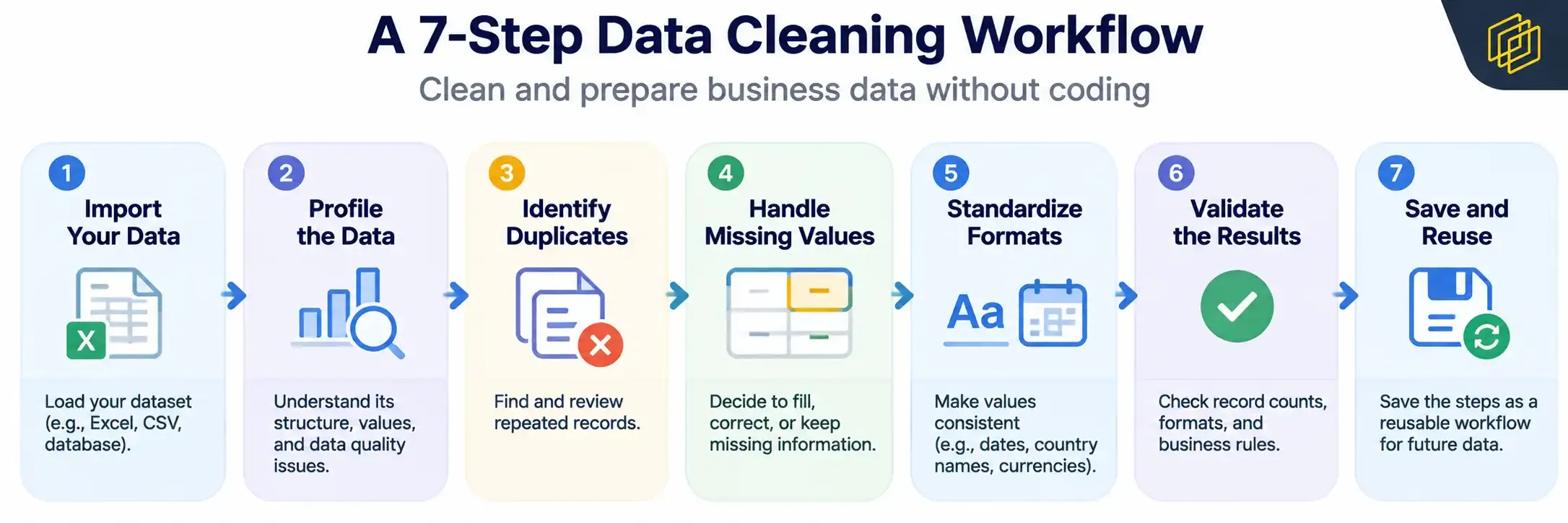
A practical no-code data cleaning workflow can be completed in seven steps.
Step 1: Import Your Dataset
Load the relevant information into your selected data cleaning tool. This could include spreadsheet files, exported customer records, or information from supported databases.
Keep an unchanged copy of the original data before applying transformations.
Step 2: Profile the Data
Inspect the dataset to understand its structure, field types, missing values, unique values, and potential inconsistencies.
This helps identify which problems require attention.
Step 3: Identify Duplicate Records
Determine whether repeated rows represent genuine duplicates or legitimate repeated transactions.
Use appropriate identifiers, such as customer IDs or order IDs, instead of relying exclusively on names.
Step 4: Handle Missing Values
Investigate why information is missing before deciding whether to remove, replace, estimate, or retain it.
A missing sales value should not automatically be treated as zero because these two values represent different situations.
Step 5: Standardize Formats
Apply consistent formats to dates, country names, currencies, text categories, and other relevant fields.
For example, USA, US, and United States may be standardized to a single country name when they represent the same location.
Step 6: Validate the Results
Review record counts, missing values, totals, and business rules after cleaning.
Compare the prepared dataset with the original information to ensure important records have not been incorrectly removed or modified.
Step 7: Save and Reuse the Process
Where supported, save the transformation steps as a reusable workflow.
When new records arrive, apply the same process and review the results before using them for analysis.
Practical Example: Cleaning Customer and Sales Data
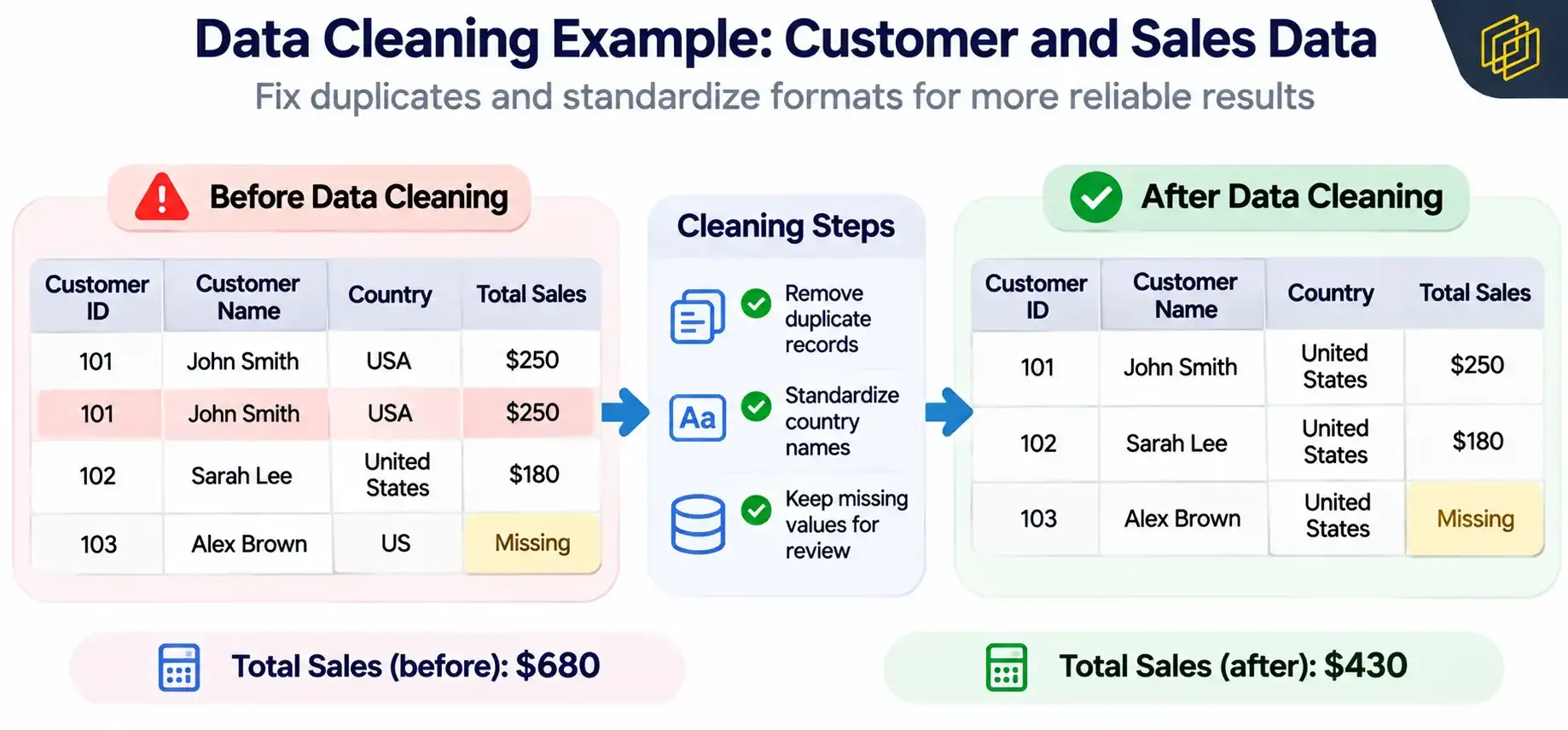
Consider a business that wants to analyze customer sales but discovers several problems in its dataset.
For this illustrative example, assume that each row should represent one customer and their total sales during a specified reporting period.
Before Data Cleaning
| Customer ID | Customer Name | Country | Total Sales |
|---|---|---|---|
| 101 | John Smith | USA | $250 |
| 101 | John Smith | USA | $250 |
| 102 | Sarah Lee | United States | $180 |
| 103 | Alex Brown | US | Missing |
The dataset contains three problems:
- Customer 101 appears twice.
- Country names use inconsistent formats.
- Customer 103 has a missing sales value.
If the duplicate is not identified, the sum of recorded sales would incorrectly appear as $680.
After Data Cleaning
| Customer ID | Customer Name | Country | Total Sales |
|---|---|---|---|
| 101 | John Smith | United States | $250 |
| 102 | Sarah Lee | United States | $180 |
| 103 | Alex Brown | United States | Missing |
After confirming that the repeated record is a genuine duplicate, the business removes it and standardizes the country names.
The missing sales value remains flagged for investigation rather than being replaced with an assumed amount.
The sum of the known sales values is now $430. However, the complete sales total remains unknown until the missing information is resolved.
This simple example demonstrates how data cleaning can prevent misleading business reports without introducing new inaccuracies.
From Clean Data to Business Insights With IIPA
Data cleaning is an important step, but preparing information is not the final business objective. Organizations ultimately need to understand what their data reveals and how it can support better decisions.
Once datasets have been prepared and validated, businesses can use analytical platforms to explore patterns, identify relationships, and answer operational questions.
IIPA is a no-code data analysis platform that allows businesses to connect information from different sources and build analytical processes through a visual, drag-and-drop interface.
Its documented analytical capabilities include:
- Clustering customers, products, or accounts.
- Identifying relationships through association rules.
- Classification.
- Fraud detection.
- Principal component analysis.
- Machine learning model training.
- Viewing analytical results through interactive dashboards.
For example, a business could prepare and validate its customer records using an appropriate data cleaning tool, then use IIPA's clustering capabilities to investigate groups of customers with similar characteristics.
This approach separates the challenge of maintaining reliable data from the process of extracting meaningful insights.
For a detailed explanation of how businesses can use visual analytical tools, read our guide on how to analyze data without coding.
Frequently Asked Questions About Data Cleaning Tools
What makes manually cleaning data challenging?
Manual data cleaning becomes challenging when datasets contain large numbers of records, inconsistent formats, missing values, and complex duplicate relationships.
Repeated manual corrections also increase the possibility of inconsistent decisions and human errors. Automated transformation workflows can reduce repetitive tasks while allowing users to review exceptions.
How do AI tools handle data cleaning automatically?
Depending on the platform, AI-assisted data cleaning tools can suggest formatting corrections, identify potentially duplicated records, detect unusual values, and recommend transformations.
Some systems use pattern recognition or machine learning to identify relationships that may be difficult to detect manually.
However, AI-generated corrections should be reviewed, especially when they involve confidential information, ambiguous records, or missing business-critical values.
What are the best free data cleaning tools?
OpenRefine and Python pandas are two useful free, open-source data cleaning solutions.
OpenRefine is particularly suitable for visual exploration and correcting inconsistent text values, while pandas provides greater flexibility for users with programming experience.
Microsoft Excel and Power Query may also be accessible through existing software subscriptions or supported free offerings.
Can you clean data without coding?
Yes. Many common data cleaning tasks can be completed without writing code.
Tools such as OpenRefine, Microsoft Power Query, Tableau Prep, and Zoho DataPrep provide visual functionality for correcting inconsistencies, identifying duplicates, transforming fields, and preparing datasets.
More complex requirements may still need technical expertise or custom expressions.
What is the difference between data cleaning and data preprocessing?
Data cleaning focuses on improving data quality by addressing errors, missing values, duplicates, and inconsistencies.
Data preprocessing is a broader process that prepares information for analysis or machine learning. It can include data cleaning alongside encoding, scaling, transformation, feature selection, and other preparation techniques.
Can data cleaning tools remove all data errors automatically?
No. While data cleaning software can detect many common problems, it cannot reliably determine the correct value for every inaccurate or incomplete record.
Some errors require business knowledge, access to original records, or human investigation.
What is the best data cleaning tool for a small business?
The best choice depends on the business's requirements.
Excel and Power Query are practical starting points for spreadsheet-based processes. OpenRefine offers a free option for messy datasets, while Zoho DataPrep may be suitable for organizations that need broader visual data preparation functionality.
Conclusion
Data cleaning tools help businesses transform unreliable, inconsistent information into datasets that are better suited to reporting, analytics, and AI applications.
OpenRefine, Microsoft Power Query, and Excel provide accessible starting points for common business data problems. More advanced platforms, such as Alteryx Designer, Dataiku, and WinPure, address specialized or complex data preparation requirements.
The most effective approach is to choose a tool that matches your data sources, technical skills, business objectives, and recurring processing needs.
Once your information has been cleaned and validated, the next step is to turn it into meaningful insights.
Explore IIPA to discover how your business can build visual data analysis workflows and investigate patterns in business data without writing code.