- Data Preparation,
- Business Intelligence
- Data Analysis Tools
- Data Visualization
- Data Analytics
- Data-Driven Decision Making
- Intelligent Process Automation
- No-Code Automation
How to Analyze Data Without Coding?
Learn how to analyze business data without coding. Explore data preparation, analytical methods, validation, and how to choose no-code tools.
- Published on
- Reading time
- 8 min read

In this article9 sections
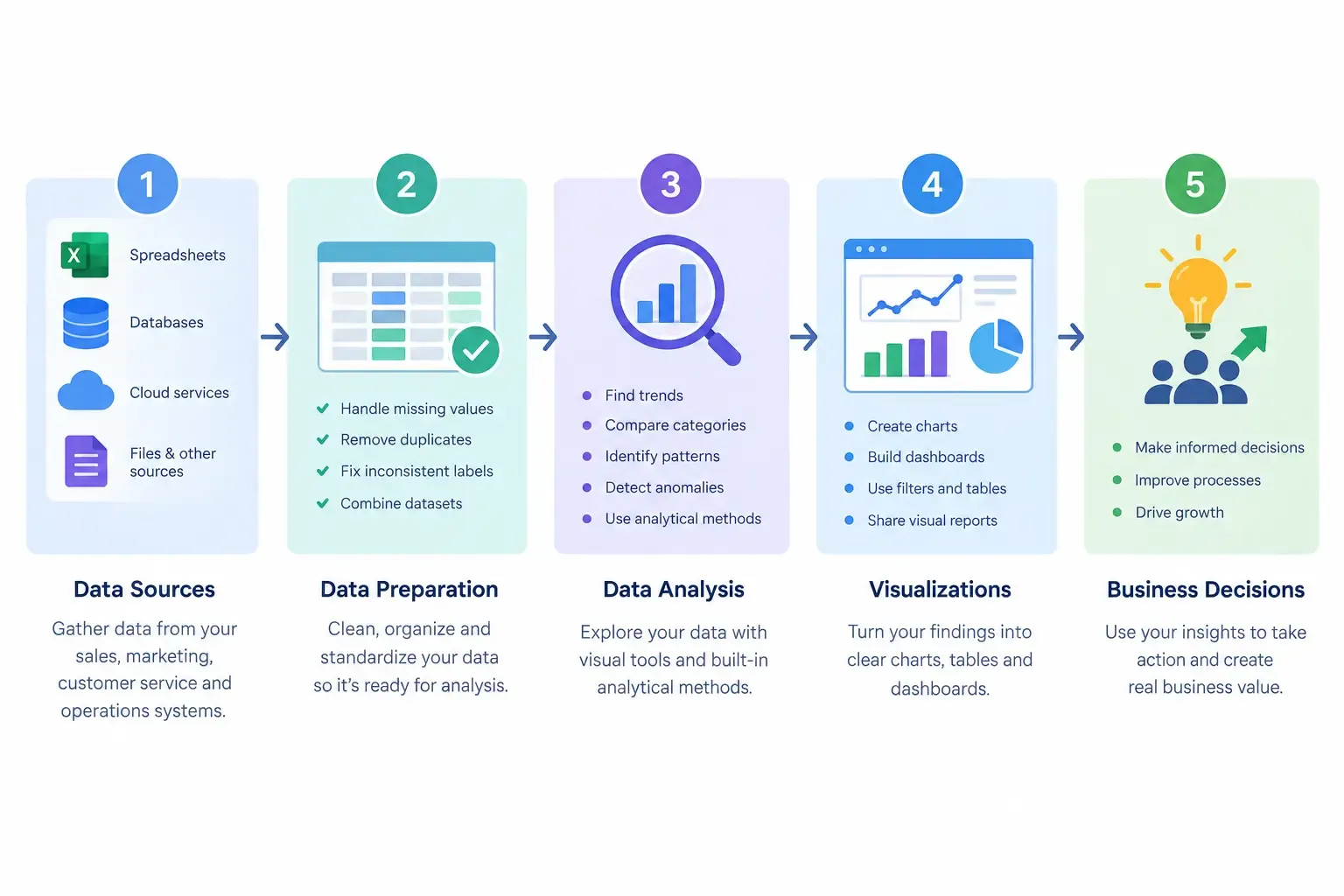
Businesses collect data from sales, marketing, customer service, and daily operations. But collecting information is only the first step. The real value comes from understanding what the data means and using it to make better decisions.
For many business owners and teams, data analysis can seem complicated because it is often associated with programming, complex formulas, and specialized technical skills. However, modern no-code tools make many data analysis tasks more accessible through visual interfaces and guided workflows.
Whether you want to understand sales performance, identify customer trends, or improve business processes, you can start analyzing data without writing code.
In this guide, you will learn how no-code data analysis works, how to analyze business data step by step, and what to consider when choosing the right tool.
What Is No-Code Data Analysis?
No-code data analysis is the process of examining, organizing, and interpreting data using visual tools instead of writing programming code for every task.
Depending on the platform, users can import data, correct inconsistencies, combine information from different sources, create visualizations, and apply analytical methods through menus or drag-and-drop workflows.
For example, a business owner might use a spreadsheet or visual analysis tool to compare monthly sales, identify the best-performing product categories, or investigate changes in customer demand.
No-code analysis does not mean that technical knowledge and analytical thinking are unnecessary. Users still need to ask the right questions, understand their data, and check whether their conclusions are supported by evidence.
The main advantage is accessibility: people who understand their business can perform many useful analytical tasks without needing to write code themselves. For a practical introduction to visual data workflows, see the KNIME Getting Started Guide.
What Can You Do With No-Code Data Analysis Tools?
The capabilities depend on the tool, but no-code data analysis can support several common business activities.
1. Understand business performance
Analyze sales, revenue, expenses, customer activity, or operational metrics to understand what is happening in your business.
For example, comparing sales across months may help reveal seasonal changes or categories that deserve further investigation.
2. Clean and organize data
Business data often contains missing values, duplicate records, inconsistent labels, or different date formats. Data preparation helps identify and address these issues before analysis begins.
Reliable preparation is important because poor-quality data can lead to misleading conclusions. IBM's data preparation and analysis tutorials provide further guidance on working with data through different analytical workflows.
3. Combine information from different sources
Businesses often store information in multiple files and systems. Combining relevant datasets can provide a more complete view of a business question.
For instance, a team might compare sales records with marketing campaign data to investigate whether campaign activity is associated with changes in sales.
4. Identify patterns and unusual activity
Analytical tools can help users explore trends, group similar records, and identify observations that differ from typical patterns.
These findings can help teams decide what to investigate next. A pattern alone, however, does not prove the reason behind it.
5. Create charts and visual reports
Charts, tables, and dashboards make information easier to interpret and communicate. The right visualization can help managers compare categories, monitor changes over time, and explain findings to colleagues.
6. Explore predictive analysis
Some platforms support predictive methods that use historical data to estimate possible future outcomes.
These estimates depend on data quality, model suitability, and validation. Predictions should be treated as evidence for decision-making, not guarantees of what will happen.
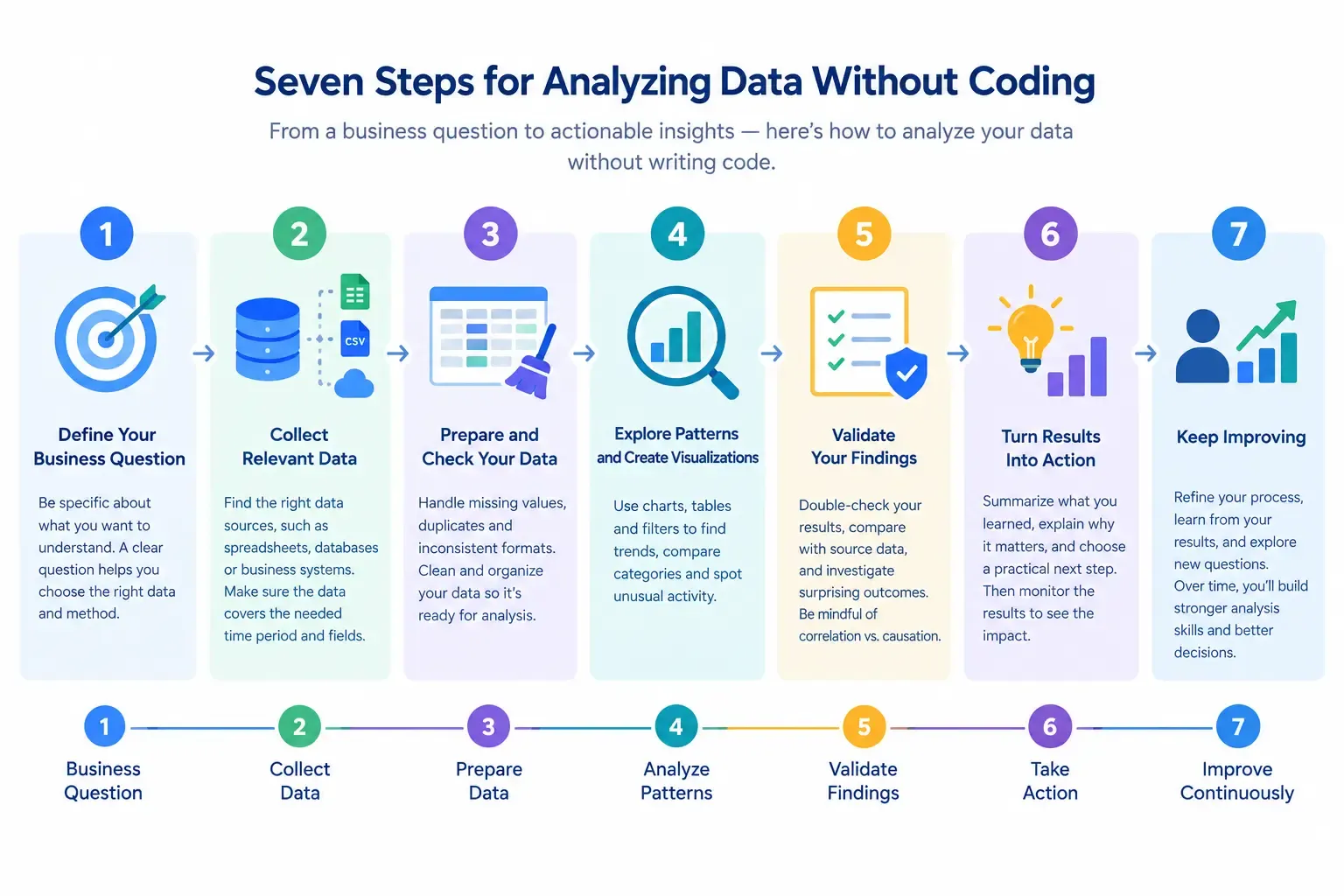
How to Analyze Data Without Coding: A Step-by-Step Process
You do not need to start with a complicated project. A focused business question and a manageable dataset are often enough to begin.
Step 1: Define your business question
Start by identifying what you want to understand.
A broad goal such as “improve sales” does not provide a clear direction for analysis. A more specific question might be:
- Which product categories have experienced declining sales?
- Which marketing channels generate the most customer inquiries?
- During which periods do operating costs increase?
- Which types of customer requests take the longest to resolve?
A clear question helps you decide what information to collect and which analytical methods are appropriate.
Step 2: Collect the relevant data
Identify the data sources that can help answer your question. Depending on your objective, these might include spreadsheets, sales records, inventory reports, customer relationship management systems, or marketing reports.
Before proceeding, check that the information covers the right time period and includes the fields you need.
Avoid collecting unrelated data simply because it is available. Focus on the information that contributes to answering your question.
Step 3: Prepare and check your data
Data preparation is one of the most important stages of the process.
Check for missing values, duplicated records, inconsistent category names, incorrect date formats, and unexpected numerical values. If you combine data from multiple sources, confirm that the fields match correctly.
For example, one file might label a product category as “Office Supplies,” while another uses “Office supplies.” These labels may refer to the same category, but inconsistent formatting can affect grouping and reporting.
Do not automatically delete unusual records. First determine whether they are errors or legitimate observations that deserve further investigation.
Step 4: Choose an analytical method
The right method depends on what you want to learn.
Descriptive analysis helps summarize what happened or what the data currently shows. It is useful for reports, averages, totals, and performance summaries.
Diagnostic analysis investigates possible explanations for an observed result. For example, a team might explore why sales declined in a particular region.
Predictive analysis uses suitable data and analytical models to estimate possible future outcomes.
Clustering groups observations with similar characteristics. A business might use clustering to explore similarities among customers or products.
Anomaly detection helps identify records or activities that differ from expected patterns.
You do not need to use the most advanced method. Start with the simplest approach that can answer your question reliably.
Step 5: Explore patterns and create visualizations
Use charts, tables, filters, and summary statistics to examine the data.
A line chart can help show changes over time. A bar chart can compare product categories, locations, or business units. A table may be more suitable when exact values matter.
Look for patterns that relate to your original question. If you discover an unexpected result, investigate it before drawing conclusions.
Step 6: Validate your findings
Before sharing results or making a business decision, verify that your analysis is trustworthy.
Compare totals with source records, check calculations, inspect a sample of the data, and investigate surprising results. If you use a predictive model, evaluate it using an appropriate validation approach.
It is also important to distinguish between correlation and causation. Two variables may change together without one directly causing the other.
Document important assumptions and limitations so that other people can understand how you reached your conclusions.
Step 7: Turn the results into action
The purpose of analysis is not simply to produce charts. It is to support better decisions.
Summarize what you discovered, explain why it matters, and identify a practical next step.
For example, a sales team that notices a decline in a particular product category might investigate pricing, stock availability, customer feedback, or changes in demand before deciding how to respond.
After taking action, monitor the results. This helps determine whether the decision made a difference and whether further analysis is needed.
How to Choose the Right No-Code Data Analysis Tool
Different tools support different tasks. The best choice depends on your business needs, available data, and team experience.
Ease of use
Choose a tool that your team can learn and use consistently. A clear interface, helpful documentation, and accessible training can reduce the learning curve.
Data source compatibility
Check whether the tool supports the files, databases, and business systems you already use. Confirm whether integrations require additional configuration or paid features.
Data preparation features
Look for capabilities that help you identify missing values, handle inconsistent formats, combine datasets, and prepare information for analysis.
Analytical capabilities
Match the platform's capabilities to your requirements. Basic reporting may not require the same functionality as predictive modeling or automated analytical workflows.
Security and data governance
Consider how the platform handles access permissions, data privacy, storage, and security. Review its policies against your organization's requirements before uploading sensitive business information.
Cost and scalability
Review subscription costs, usage limits, dataset size restrictions, implementation requirements, and ongoing maintenance. Consider whether the tool can support your needs as the business grows.
Transparency and validation
Choose a workflow that lets you inspect data transformations, understand how results were produced, and validate outputs before acting on them.
How IIPA Fits Into a No-Code Data Analysis Workflow
IIPA describes its platform as a visual, no-code approach to data analysis and intelligent process automation. Its official website outlines capabilities related to data integration, data preparation, descriptive and predictive mining, and model-related workflows.
For businesses exploring no-code analysis, the important consideration is how a platform's actual features align with the questions the team needs to answer.
Start by identifying one business problem and determining which data sources are required. Then assess whether the platform supports the necessary preparation and analytical steps, whether the results can be validated, and whether the workflow fits your operational requirements.
Before adopting any platform for an important business process, confirm its supported data sources, implementation needs, security arrangements, and limitations.
When Do You Still Need Technical Expertise?
No-code tools make many analytical tasks more accessible, but they do not eliminate every need for technical expertise.
Specialist support may be useful when working with complex system integrations, sensitive data, advanced statistical methods, sophisticated machine learning models, or large-scale production workflows.
Technical experts can also help establish data governance, build reliable validation processes, and investigate results that appear inconsistent or unreliable.
For many businesses, a combination of business knowledge and technical expertise works well. Business teams understand the questions that matter, while specialists can help address complex technical requirements when needed.
Common Mistakes to Avoid
Even with an easy-to-use tool, poor analytical practices can lead to misleading results.
Starting without a clear question: Collecting and exploring large amounts of data without an objective can waste time and make it difficult to identify useful findings.
Ignoring data quality: Missing values, duplicates, and inconsistent formats can distort reports and comparisons.
Choosing an unnecessarily complex method: Advanced analysis is not automatically better. Use a method that fits the question and the quality of the available data.
Assuming every pattern is meaningful: Some patterns occur by chance or reflect incomplete information. Investigate important findings before acting on them.
Treating predictions as facts: Forecasts and model outputs contain uncertainty. Consider their limitations and validate them before using them to guide important decisions.
Creating reports without taking action: A report is useful only when it helps someone understand a problem, make a decision, or identify a next step.
Conclusion
Analyzing data without coding can help business teams turn scattered information into clearer insights. With a focused question, reliable data, an appropriate analytical method, and careful validation, many useful analyses can be completed through visual tools.
Start with one practical business problem. Prepare the data carefully, explore the results, check your findings, and use what you learn to guide a decision.
As your needs develop, evaluate whether a no-code platform provides the data connections, analytical capabilities, security, and workflow features your team requires.
To explore a platform designed around visual data analysis and intelligent process automation, visit IIPA's official website.
Sources and Further Reading
- IIPA — Official Website — Official description of IIPA and its stated platform capabilities.
- KNIME — Getting Started Guide — Introduction to visual workflows for reading, cleaning, combining, and visualizing data.
- IBM — Quick-Start Tutorials — Documentation covering data preparation, analysis, visualization, and related workflows.